Testing
Testing Overview
As has already been discussed in the 'Test Plan' in the 'Design' section of this documentation, I will be employing two types of testing to ensure that this application continually meets the specification requirements and adding new features does not break previously working functionality within the program. These two types of testing are unit testing and regression testing.
Testing Method
Within both the regression testing and unit tests, I will be using BET testing (Boundary, Erroneous, Typical), this will help to make sure that I test that both valid values are accepted and that invalid values are rejected. As the acronym suggests, with BET testing the key is to test valid values that are both typical and boundary cases, as well as testing the invalid boundary values and erroneous data. For example, we have a variable 'x' that must be an integer between 3 and 7 inclusive, the following list of tests would a good set of tests to run.
| x value | type | expected |
|---|---|---|
| "asdf" | Erroneous | false |
| [] | Erroneous | false |
| -493 | Erroneous | false |
| 2 | Boundary - invalid | false |
| 3 | Boundary - valid | true |
| 4 | Typical | true |
| 5 | Typical | true |
| 6 | Typical | true |
| 7 | Boundary - valid | true |
| 8 | Boundary - invalid | false |
| 204 | Erroneous | false |
By checking that the result of each of these tests are as expected we can ensure that the validation for x is valid.
Manual Testing Plan
Below is the regression testing plan that was used to ensure that the imports page was working correctly. A test plan similar to this was created and used for each page of the application, before a major commit was pushed to GitHub. By having a set list of instructions to follow, to ensure that the page was working correctly, it was quick and simple to check that the functionality of the page had not been negatively affected by the addition of any new features.
Imports
- Title in the header checks user wants to leave the page.
- 'Yes' takes the user to the application page.
- 'No' keeps the user on the same page.
- Settings button in the header checks user wants to leave the page.
- 'Yes' takes the user to the settings page.
- 'No' keeps the user on the same page.
- Cross button in the header checks user wants to leave the page.
- 'Yes' takes the user to the application page.
- 'No' keeps the user on the same page.
- JSON has been loaded into the text area.
- User can change text in text area.
- Import status changes to 'Import status: JSON has been modified.'
- Import status changes to 'Import status: JSON has been modified.'
- User can click to check their JSON is valid.
- If valid imports status changes to 'Import status: Valid JSON entered.'
- If invalid imports status changes to 'Import status: Invalid JSON entered.'
- User can change text in the password text box.
- User can click to save their JSON to the server.
- If invalid, imports status changes to 'Import status: Invalid JSON entered.'
- If incorrect password, imports status changes to 'Import status: Incorrect password.'
- If correct password, imports status changes to 'Import status: New configuration saved.' and the new configuration is saved on the server.
- Cancel button checks user wants to leave the page
- 'Yes' takes the user to the application page
- 'No' keeps the user on the same page
Automated Testing
Instead of manually testing all of the back end components as was done with the user interface, unit tests will be used. This allows unit tests to be programmed once and then, whenever desired, all of the tests can be run without any extra effort.
One example of automated testing in this project is for the configuration JSON validation.
Found in /masters_source/vagrant/twitterViz/templates/validationTester.html or at [domain]/tester if you have 'web.py' running. When run, this file performs a number of set tests and then shows the number of tests that passed.
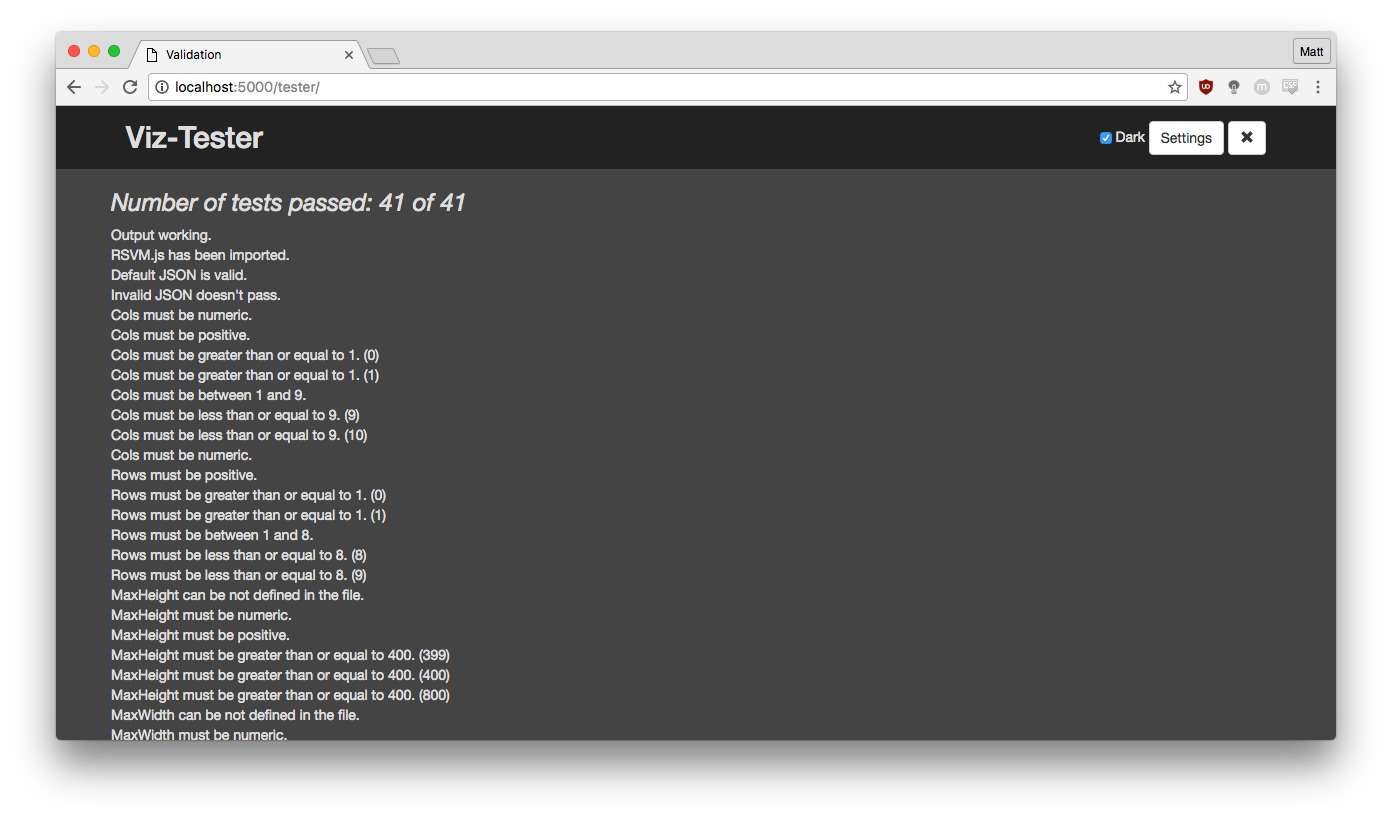
Below is all of the tests that check the validation on the 'cols' variable.
    function test4(){
        desc = "Cols must be numeric.";
        testJson = defaultJSON.substring(0,8) + '"a"' + defaultJSON.substring(9);
        bool = !(valiJSON(testJson));
        if (!bool) { console.log(testJson); }
        return printT(bool, desc);
    }

    function test5(){
        desc = "Cols must be positive.";
        testJson = defaultJSON.substring(0,8) + '-14' + defaultJSON.substring(9);
        bool = !(valiJSON(testJson));
        if (!bool) { console.log(testJson); }
        return printT(bool, desc);
    }

    function test6(){
        desc = "Cols must be greater than or equal to 1. (0)";
        testJson = defaultJSON.substring(0,8) + '0' + defaultJSON.substring(9);
        bool = !(valiJSON(testJson));
        if (!bool) { console.log(testJson); }
        return printT(bool, desc);
    }

    function test7(){
        desc = "Cols must be greater than or equal to 1. (1)";
        testJson = defaultJSON.substring(0,8) + '1' + defaultJSON.substring(9,109) + "]}";
        bool = (valiJSON(testJson));
        if (!bool) { console.log(testJson); }
        return printT(bool, desc);
    }

    function test8(){
        desc = "Cols must be between 1 and 9.";
        testJson = defaultJSON.substring(0,8) + '5' + defaultJSON.substring(9,294) + ', {"cell": "cell0-3","h": 2,"w":2,"func": "","dstream": "min"}]}';
        bool = (valiJSON(testJson));
        if (!bool) { console.log(testJson); }
        return printT(bool, desc);
    }

    function test9(){
        desc = "Cols must be less than or equal to 9. (9)";
        testJson = defaultJSON.substring(0,8) + '9' + defaultJSON.substring(9,294) + ', {"cell": "cell0-3","h": 2,"w":6,"func": "","dstream": "min"}]}';
        bool = (valiJSON(testJson));
        if (!bool) { console.log(testJson); }
        return printT(bool, desc);
    }

    function test10(){
        desc = "Cols must be less than or equal to 9. (10)";
        testJson = defaultJSON.substring(0,8) + '10' + defaultJSON.substring(9);
        bool = !(valiJSON(testJson));
        if (!bool) { console.log(testJson); }
        return printT(bool, desc);
    }

    function test11(){
        desc = "Cols must be numeric.";
        testJson = defaultJSON.substring(0,17) + '"a"' + defaultJSON.substring(18);
        bool = !(valiJSON(testJson));
        if (!bool) { console.log(testJson); }
        return printT(bool, desc);
    }
By the end of the tests, the variable has been tried as a string, as well as BET integer values. If all the tests pass, we can be sure that if 'valiJSON' says that the 'cols' vaiable is valid then it almost certainly is.
Tests like these were written for most variables used in the configurator as well as other areas of the back end. These tests made it much easier to keep the application up and running.
Testing Summary
Overall, I believe that the way that this application was tested throughout its development was very successful. Using regression testing for the front end was a good choice as time was not wasted writing lots of complicated tests to ensure that the page loaded correctly. Ensuring that a page loads visually correctly would have required dozens of tests for a page as complicated as the visualisation page whereas the human eye is able to tell if something is off almost instantly. Using unit tests to maintain a working back end was also a good choice as it allowed me to focus on writing the program and not have to manually test every aspect of the program any time a change was made. If the project was to continue then it may be worth writing unit tests for the front end, but as this is a set duration project I maintain that would not have been the most effective use of time.